Scheduling · Appointment reminders
Appointment reminders patients confirm.
Sending the reminder is half the job. Sara texts the day before, asks the patient to confirm with one word and, if they can’t make it, offers another time in the same thread. Your schedule arrives full, and nobody at the front desk has to call anyone.
Practices already running on Sara
-
FaceUp
Aesthetic medicine
-

DrReyes
Rhinoplasty
-

Physiup
Physiotherapy
-

Sorace & Mendoza
Plastic & aesthetic surgery
Reminds the day before
Date, time, address and what to bring, in the patient’s text thread.
Gets a confirmation
The patient replies YES and the appointment is confirmed in your schedule.
Reschedules if they can’t
Offers another time in the same thread and frees the slot for the waitlist.
How Sara does it
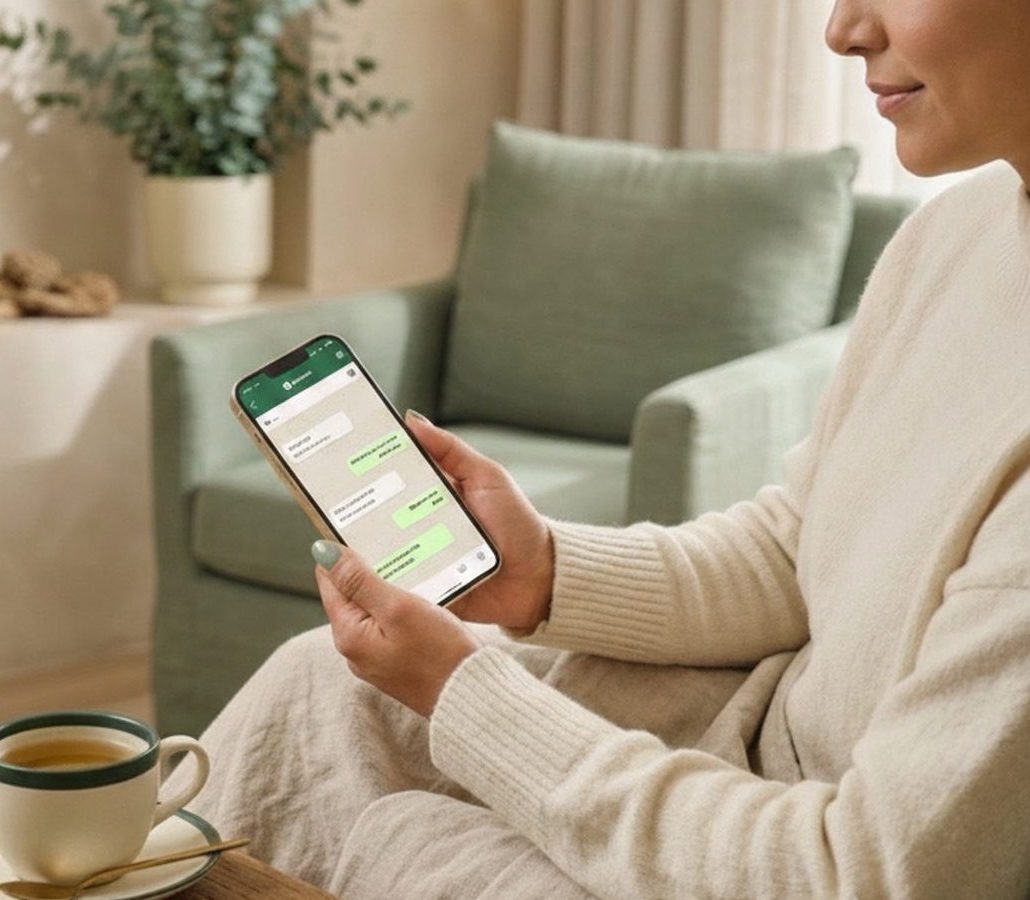
A medical appointment reminder, exactly as the patient gets it.
This is a real reminder. Sara writes in your practice’s tone, with the appointment details and one clear question. The patient answers in seconds, with no app to download and no portal to log into.
If they confirm, the appointment turns to ✅ Confirmed in your dashboard. If they go quiet, Sara asks again. If they can’t make it, she reschedules. Nobody at the front desk picks up the phone.
 Sara Active now
 From a booked appointment to a patient who shows up.
The appointment lands in your schedule
Sara books it from the chat, or your team adds it in the platform. Either way, Sara sees it and looks after it.
Sara reminds and confirms
The day before, she texts, asks for a confirmation and follows up if there’s no reply. With judgment, not a barrage.
The schedule arrives full
Confirmed, rescheduled or released to the waitlist. No front-desk calls and no surprises at 9 am.
Confirmation
One word to confirm, straight into your calendar.
The patient replies YES and the appointment turns to confirmed in your dashboard and the platform. If there’s no reply, Sara asks again a few hours later. If it stays quiet, your team sees it flagged and decides what to do.
- Confirm with a YES, no apps or forms
- A second nudge when there’s no reply
- The status shows in your dashboard and your schedule
Sara Active now Rescheduling
If they can’t make it, she reschedules in the same thread.
A “can’t make it” isn’t a lost hour. Sara offers two specific times, moves the appointment in your schedule and offers the freed slot to the waitlist. All in the same conversation.
- Offers real times, not a “call us to reschedule”
- The freed slot goes to the waitlist
- Nothing for the front desk to coordinate
Sara Active now Medical practices
Medical appointment reminders with instructions.
For consults and procedures, the reminder carries what the patient needs to know: the provider, fasting, paperwork, where to check in. Fewer “do I need to fast?” calls and fewer appointments lost over a detail.
- Instructions per consult or procedure type
- Provider name and suite or floor
- Works for medical practices, clinics and labs
Sara Active now Dental offices
Dental appointment reminders, and the six-month recall.
In dentistry, the appointment that slips the most is the recall. Sara reminds tomorrow’s appointment and, when it’s due, reaches out to book the cleaning or check-up that got left behind. Your schedule doesn’t depend on the patient remembering.
- Reminders for cleanings, check-ups and orthodontics
- Brings back the patient who missed the recall
- Works alongside what your front desk books
Sara Active now The deposit
The reminder that works best is collected at booking.
The message reminds; the deposit commits. When a patient leaves a deposit at booking, the no-show all but disappears: people who paid show up. Sara collects it with a payment link inside the same thread, before giving the slot.
- Deposit or prepaid consult, your call
- Secure payment link inside the chat
- Fewer no-shows from the first month
- See how Sara collects payments
Sara Active now Let tomorrow’s schedule arrive confirmed today.
How it looks in your dashboard
Every reminder leaves a status.
In the Chats inbox you see at a glance which of tomorrow’s appointments are confirmed, which moved and which are still unanswered. Without calling anyone to find out.
Sara sent the reminder for tomorrow’s appointment.
The patient replied they’re coming. The slot is yours.
No reply, so Sara asked again. The counter shows how many times.
The patient couldn’t make it and Sara moved the appointment to another time in your schedule.
Frequently asked questions
How does Sara send appointment reminders?
By text message, from a line connected to your practice. She takes the appointment from her own scheduling and writes the day before with the date, time, address and any instructions you define. No lists to export, no messages to copy.
How far in advance does she send them?
By default, the day before, at a time when people actually reply. It can be adjusted per practice and per appointment type (for example, two notices for procedures that need prep). We set it up together during onboarding.
What happens if the patient doesn’t reply?
Sara asks again a few hours later. If it stays quiet, the appointment is flagged in your dashboard so your team can decide. And if the patient replies at any hour, even 11 pm, Sara answers.
Does it work as a medical appointment reminder service and for dental offices?
Yes. It’s the same reminder with different content: fasting or paperwork for medical consults, retainers and six-month recalls for dental, no makeup for aesthetic treatments. It’s configured per appointment type.
Do I need to change my scheduling software?
Scheduling is her own and lives in the platform. Coming from AgendaPro, Zenoti or GlossGenius? We import your services, prices and patients.
Can I customize the message?
Yes. The tone, your practice’s name, the details it includes and the instructions per treatment are defined with you. And it’s a conversation, not a blast: if the patient asks something, Sara answers.
Is there a per-message fee for reminders?
No. Reminders are part of what Sara does, along with answering, booking and collecting. There’s no per-message or per-appointment fee: it’s a monthly subscription built for each practice and shared in the demo.
Does this actually reduce no-show appointments?
The reminder cuts them; the deposit almost removes them. Sara can ask for a deposit or a prepaid consult at booking, with a payment link in the same thread. You decide which treatments it applies to.
What should an appointment reminder text say?
Keep it short, with the date, the time and one clear action. For example: “Hi Maria, this is a reminder of your appointment at Sunrise Dental tomorrow, Thursday at 10:30 am. Reply YES to confirm. If you can’t make it, let us know and we’ll offer another time.” For a medical visit, add the prep (fasting, paperwork); for dental, the six-month recall; for a med spa, no makeup or sun exposure. Sara writes it in your practice’s voice.
How does an appointment confirmation text work?
The patient replies YES to the text and the appointment is confirmed in your schedule. If they reply that they can’t come, Sara offers another time in the same thread and releases the slot to your waitlist. If there is no reply, she asks again and flags the appointment in your dashboard.
The AI team that never clocks out
Don't let the next 11:41 pm text go unanswered.
Put Sara on your front desk today, and bring in Mia and Daniel when you are ready. Without changing how you work.