Sara · Patient records
Text the
note.Sara
files it.
Text Sara a note or a photo after the visit and it goes straight into the patient's record.
Practices already running on Sara
-
FaceUp
Aesthetic medicine
-

DrReyes
Rhinoplasty
-

Physiup
Physiotherapy
-
Sorace & Mendoza
Plastic & aesthetic surgery
Notes and photos by text
From your phone, between patients, without opening a laptop.
Nothing saves without your YES
Sara confirms the note and the patient with you before saving.
Only the right people see it
Access by role and by person, with a log of who opens each record.
What it looks like by text
The visit ends and the note is already saved.
You text Sara on your practice's number, from the phone saved on your user. She recognizes you as part of the team and treats you that way.
- 01
Text the note
Start with “note for” and the patient's name, then what you want to note. Your phone's dictation works too.
- 02
Sara confirms the patient
She finds the patient and asks you before anything is saved.
- 03
Reply YES and it is saved
In the patient's record, with the date and your name.
 Sara Active now
Clinical photos
Send the photo,
Sara saves it.
Before and after, the treated area, how a scar is healing. Take the photo on your phone, text it to Sara and it goes into the patient's record, with the date and your name.
- Whatever you type with the photo becomes its caption
- Sara asks which patient it is for and saves on your YES
- Takes JPG, PNG or WebP up to 10 MB
Sara Active now 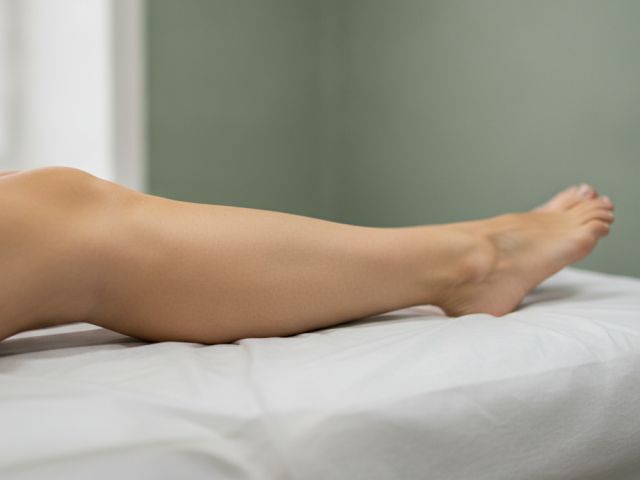 Right leg, after the second session
In the dashboard
The whole history,
in one place.
Every patient profile has a Chart tab with clinical notes and photos, newest first, with the date and who wrote each one. What you text Sara shows up right there, next to what was added in the dashboard.
- Clinical notes and photos, straight from your phone camera too
- Kept apart from front desk notes, which the whole team sees
- Photos open through a temporary link that expires on its own
Mary Smith
…4821
Clinical notes and photos. Only people with permission can see them.
Write a clinical note
-
Photo
Right leg, after the second session
Today 1:46 pm by Dr. Paula Ríos
-
Second laser session, lower legs. No skin irritation. Next session in six weeks.
Today 1:43 pm by Dr. Paula Ríos
-
First session. Skin type III, no medication. Aftercare explained.
Sep 12 10:20 am by Dr. Paula Ríos
No mixed-up patients
Two Annas?
Sara asks.
Sara looks the patient up by name or phone. If she finds several close matches, she lists up to five and you pick a number. A provider can only pick patients who have an appointment with them.
- Nothing is saved until you reply YES
- If you do not confirm within ten minutes, the draft is discarded
- Pick by number, or type the full name or the phone number
Sara Active now Health data deserves more care than a booking.
Patient records have their own permission, separate from the rest of the dashboard. Clinical data is only seen by the people who need it.
Access by role and by person
By default the owner, the practice admin and the provider can see it, and providers only see patients they treated. Front desk and read-only users cannot. You adjust it per user in Settings.
Access log
Every time someone opens a patient record, or adds or deletes a note or photo, it is logged, including what came in by text.
Sara does not read it
Sara, Mia and Daniel never use patient records to answer anyone. If someone outside the team writes in, Sara says nothing about them.
Get the note written before the next patient.
Patient records are part of Sara's scheduling. Your team can also text her to move visits or notify patients: Sara for your team. And everything is on your phone in the Sara app.
Common questions
What are patient records in Sara?
It's the Chart tab in each patient profile where clinical notes and photos live: what you observed, the treatment you did and how it is progressing. It's separate from front desk notes, which are operational and visible to the whole team.
How do I text Sara a note?
Text your practice's Sara number from the phone saved on your user, starting with “note for” and the patient's name, then the note. Sara confirms the patient and saves it when you reply YES.
How do I save a photo to a patient record?
Text the photo to Sara, with or without a caption. Sara asks which patient it is for and saves it when you reply YES. You can also add it from the dashboard with “Take photo” or “Upload file”. It takes JPG, PNG or WebP up to 10 MB.
Which language does it work in?
English and Spanish. Start with “note for” and Sara replies in English; start with “nota de” and she replies in Spanish, so each provider uses their own. In the dashboard you can write notes in any language.
Can I dictate instead of typing?
Yes. Use your phone's dictation to write the text, and read it over before you send it: names and clinical terms are easy to get wrong.
Who can see patient records?
By default the owner, the practice admin and the provider, who only sees patients they treated. Location managers and read-only users cannot. You can allow or block it per person in Settings, Users, and a block always wins.
What if someone outside the team sends a note?
Nothing is saved and Sara answers them like anyone else, without mentioning records. Nobody can find out a record exists by writing from a random number.
Does Sara use patient records to answer patients?
No. Sara, Mia and Daniel never read patient records, and nothing you save there goes into their replies.
How much does it cost?
It's included in every plan, starting with the Individual plan at US$49 a month. To text notes and photos, your practice's Sara line needs to be connected. Pricing is on the pricing page.
The AI team that never clocks out
Don't let the next 11:41 pm text go unanswered.
Put Sara on your front desk today, and bring in Mia, Daniel and Elena when you are ready. Without changing how you work.